Moving to Dubai for work is an exciting opportunity, but navigating the administrative processes can be overwhelming. One of the most important tasks for any expat is obtaining and tracking their Emirates ID status.
This guide will walk you through everything you need to know about checking your Emirates ID status, solving common problems, and accessing additional resources to make your transition smoother.
What is an EID Card?
The Emirates ID card is a mandatory identification card for all UAE residents, including expats.
It serves as proof of identity, grants access to government services, and is required for tasks like opening a bank account, signing a rental agreement, or obtaining a SIM card.
How to Check Your Emirates ID Status Card?
With these 3 simple steps you can check the status of your id card online.
Step 1: Visit the Official ICP Website
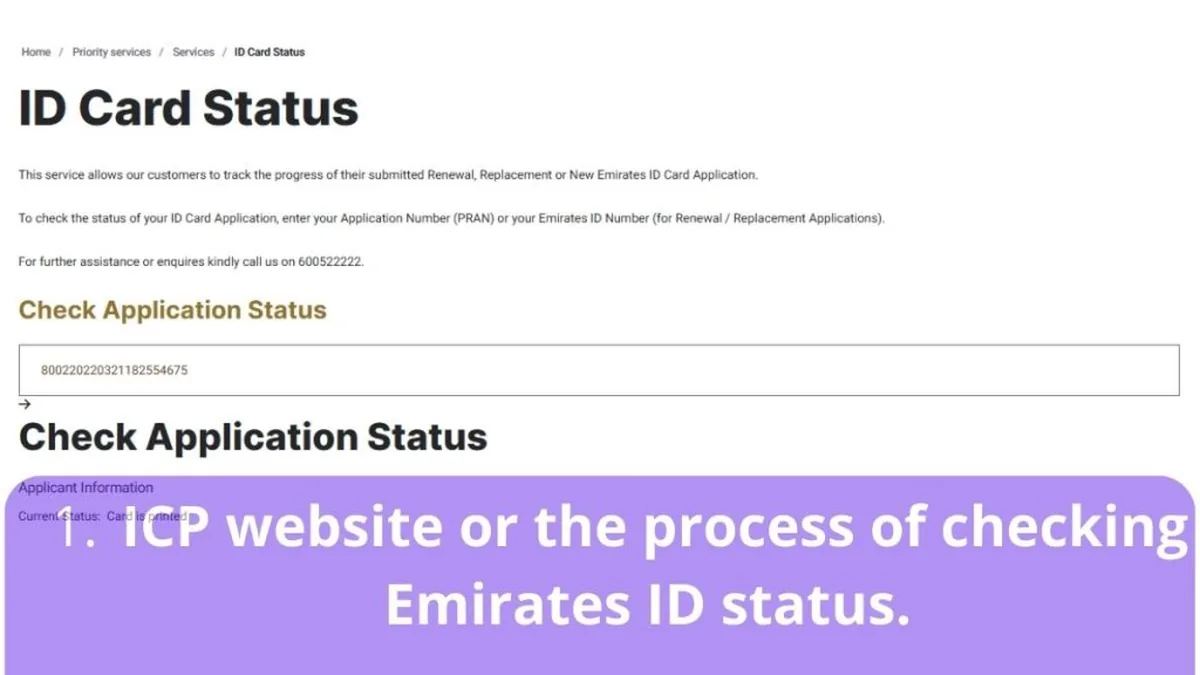
The Federal Authority for Identity, Citizenship, Customs & Port Security (ICP) provides an official portal to check your Emirates ID status.
- Go to the ICP Website.
- Click on the "ID Card Status" service.
Step 2: Enter Your Details
You’ll need to provide one of the following:
- Your Application Number (PRAN)
- Your Emirates ID Number (if already issued)
- Your Passport Number
Step 3: Check Your Status
Once you submit your details, the system will display your Emirates ID status.
Common statuses include:
- Under Process: Your application is being reviewed.
- Printed: Your card is ready for collection.
- Dispatched: Your card is on its way to the delivery address.
- Collected: Your card has been delivered.
Common Problems Expats Face with Emirates ID
If your card is ready you can track it, otherwise you may receive one of the following warning messages.
- Delays in Processing
- Cause: High application volumes or incomplete documentation.
- Solution: Double-check your documents and follow up with ICP.
- Incorrect Personal Information
- Cause: Typographical errors during application.
- Solution: Contact ICP immediately to rectify the issue.
- Lost or Damaged Emirates ID
- Cause: Misplacement or wear and tear.
- Solution: Apply for a replacement through the ICP website.
- Difficulty Accessing Online Services
- Cause: Lack of familiarity with the ICP portal.
- Solution: Use the step-by-step guide above or visit an ICP customer service center.
If you have any problems with the procedure or need help you can go to a typing centre near you and ask for help with the process.
Additional Resources for Expats in Dubai
As an expat, you might face other challenges beyond your Emirates ID. Here are some additional resources to help you settle in:
- Visa Status: Check your residency visa status through the General Directorate of Residency and Foreigners Affairs (GDRFA).
- Bank Account Opening: Learn about the required documents and procedures for opening a bank account in Dubai.
- Healthcare Services: Register for a health card to access public healthcare services.
- Driving License: Understand the process of converting your home country license or obtaining a new one.
FAQs About Emirates ID Status
1. How long does it take to get an Emirates ID?
The processing time typically takes 7-10 working days after your application is submitted. Delays can occur due to high demand or incomplete documentation.
2. Can I track my Emirates ID delivery?
Yes, once your Emirates ID is dispatched, you can track its delivery using the tracking number provided by ICP.
3. What should I do if my Emirates ID is lost or stolen?
Report the loss immediately through the ICP website or visit a customer service center to apply for a replacement. A fee will apply.
References to Official Bodies
- ICP Official Website: https://icp.gov.ae
- GDRFA Dubai: https://www.gdrfad.gov.ae
- Dubai Government Services: https://www.dubai.ae
- Reddit Post: Check reviews expats about this link
By following this guide, you’ll be able to check your Emirates ID status with ease and resolve any issues that may arise. Welcome to Dubai, and best of luck with your new journey!
Emirates ID Processing Time — What to Expect in 2026
Standard Emirates ID applications in the UAE are typically processed within 5 to 10 working days after biometric capture, though this can stretch to 2–3 weeks during peak periods such as the back-to-school season or Ramadan. Residents in Dubai who apply through Amer Centers often see faster turnaround times because GDRFA systems are directly integrated with ICP. If your status has shown "under process" for more than 15 working days, contact the ICP customer service line or visit a typing center to raise a follow-up request — typing centers can submit status inquiries on your behalf through the ICP e-channel.
What to Do If Your Emirates ID Application Is Rejected
Rejections are rare but happen, most commonly due to mismatched data between your passport, visa, and application form, or because of failed biometric capture. If your Emirates ID status shows "rejected", the first step is to obtain the rejection reason from the ICP portal or your typing center. Most rejections are resolved by correcting the data entry and reapplying — typing centers charge a reduced fee for re-submissions (typically AED 20–50 instead of the full service fee). In cases where the rejection relates to your residency status itself, you will need to regularise your visa first before reapplying for the ID card.
Emirates ID Renewal vs. Replacement — Know the Difference
Many expats confuse renewals with replacements. A renewal applies when your card has expired or expires within 90 days, and it costs AED 100 per year of validity (plus a AED 70 ICP service fee and typing center charges). A replacement applies when your card is lost, stolen, or damaged while still valid — replacement fees start at AED 300 and the process is faster since no biometrics are usually required. Lost cards should be reported immediately through the ICP portal to prevent identity misuse; a police report is not mandatory but is recommended for insurance claims.
Where to Collect Your Emirates ID and What to Bring
Once your status shows "printed", your card is dispatched to the collection point you selected during application. Options include ICP Customer Happiness Centers, Emirates Post offices, and some typing centers that offer card collection as a convenience service. Bring your passport, a copy of your application receipt, and your original Emirates ID if you are renewing. Cards are held for a limited period before being returned to ICP, so collect yours promptly. If you are outside the UAE when the card is ready, you can authorise a friend or PRO to collect it with a formal authorisation letter.
Updating Your Emirates ID Data — Address, Job and Marital Status
UAE residents are required to update their Emirates ID within 30 days of any change in personal data: new address, job change, marital status, or passport number. Updating an address or job can be done through the ICP smart app or the TAMM portal in Abu Dhabi — no physical visit needed in most cases. Data updates are free of charge when done online; typing centers may charge a small service fee (AED 30–60) if they complete the update for you. Failing to update your details can cause problems when renewing your visa, opening a bank account, or passing through Smart Gates at UAE airports.
Related Services and Guides
If you need help with your paperwork, these resources may help:
- typing centers in Dubai
- Emirates ID typing centers
- Emirates ID Typing Centers UAE: Application, Renewal & Fees Guide
- Emirates ID Status Check UAE: Track Your Card Online in Minutes
You can also browse our complete directory of typing centers in Dubai or all services to find a verified center near you.